
Smart Scheduling. Optimized Practice.
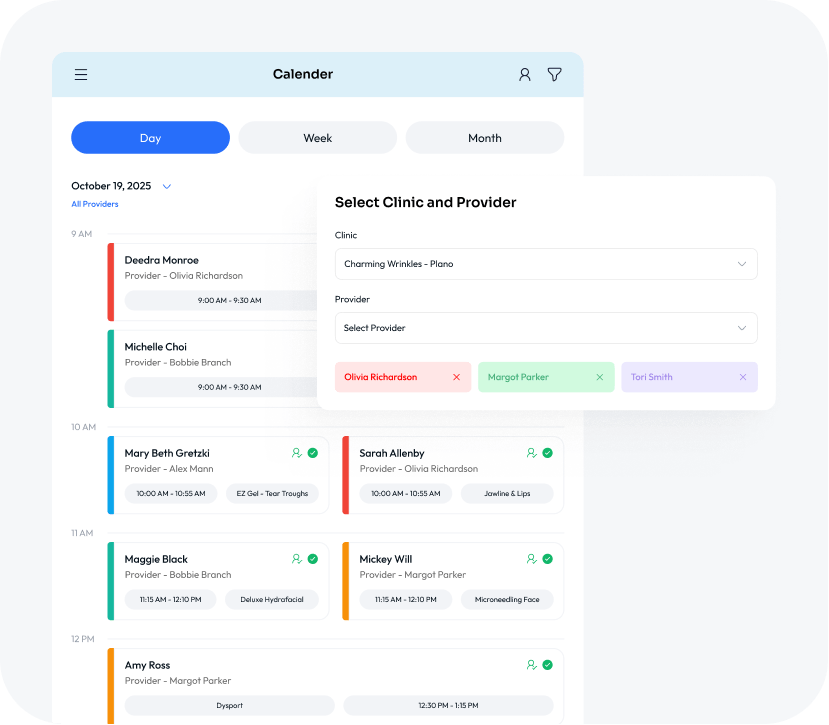
Aesthetic Record’s Smart Scheduling is the brain behind your calendar, ensuring every minute of your day is profitable. You set the rules—hours, equipment, and provider availability—and our intelligent system handles the rest, eliminating incorrect bookings and maximizing resource utilization.
From Startup to Scale, We’re Built for Every Stage.
See how AR powers your next move.
Real-Time Resource Management
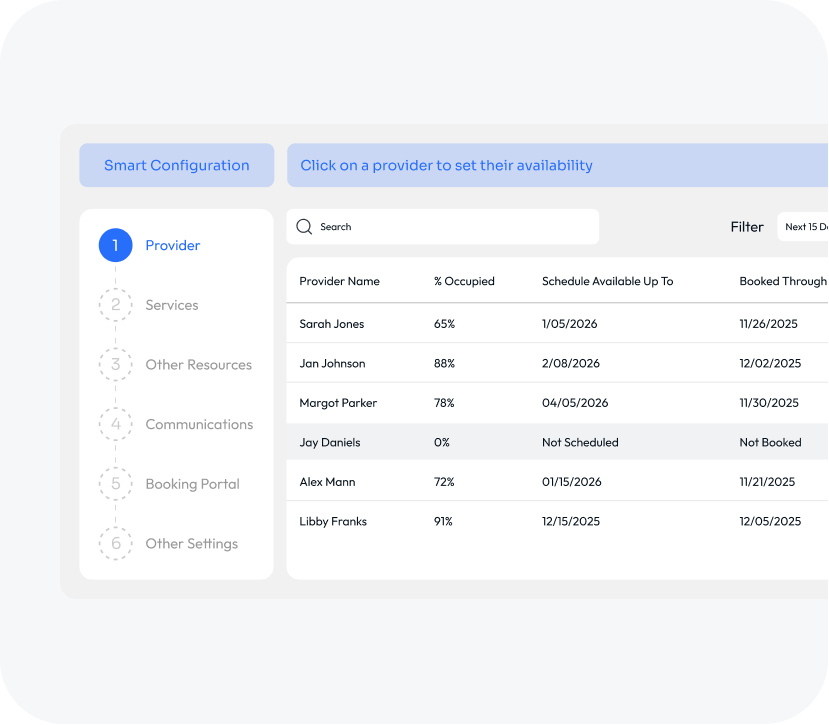
Creating a schedule with dozens of services, multiple rooms, devices, and individual provider hours can be daunting. Smart Scheduling tracks and manages all your critical resources—from specific treatment rooms and specialized lasers to individual providers—in real-time. This ensures every appointment booked is viable, protecting your practice’s flow and reputation.
Provider Schedule Tracking
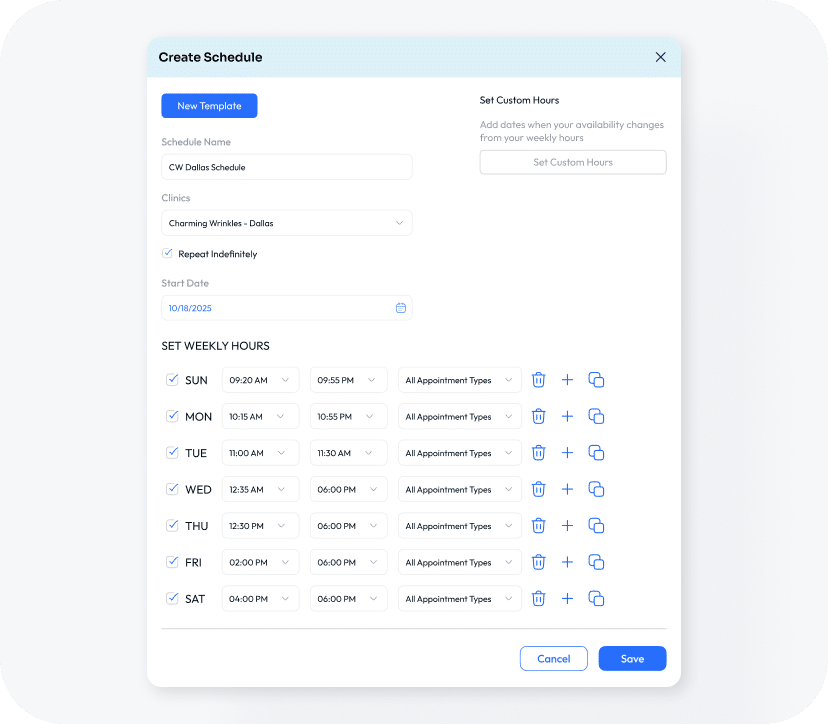
Providers can define their schedules using templates that are easy to create and change as needed. Templates allow you to set a standard schedule, including specific virtual and in-person availability, for your typical week and include custom hours for those periodic days where they want to stay late or come in early. You can create multiple templates to accommodate the busy holiday rush or to reduce hours in the slower summer months.
Enhanced Booking Capability for Staff
Staff can go beyond the general scheduling capabilities to ensure the schedule stays optimized. Users can book Out of Office events, add to the Waitlist, edit time slots and more. Smart Scheduling allows you to override schedule defaults to accommodate nearly every situation.
Out of Office Events
Providers may need to block tme for lunch breaks, training events, or personal matters. With Out of Office blocks, providers can reserve time on their schedule so the Front Desk knows that time is off limits, it’s unavailable for online booking, and it doesn’t count against their booking percentage or Revenue Per Hour metric.
Add to Waitlist
When schedules are full and clients still need in, you need an organized way of documenting their preferences and putting them in a queue. With the Waitlist, staff can add patients based on their preferences for services, providers, time and day, and add a credit card to secure the listing if it becomes an appointment.
Booking Multiple Services
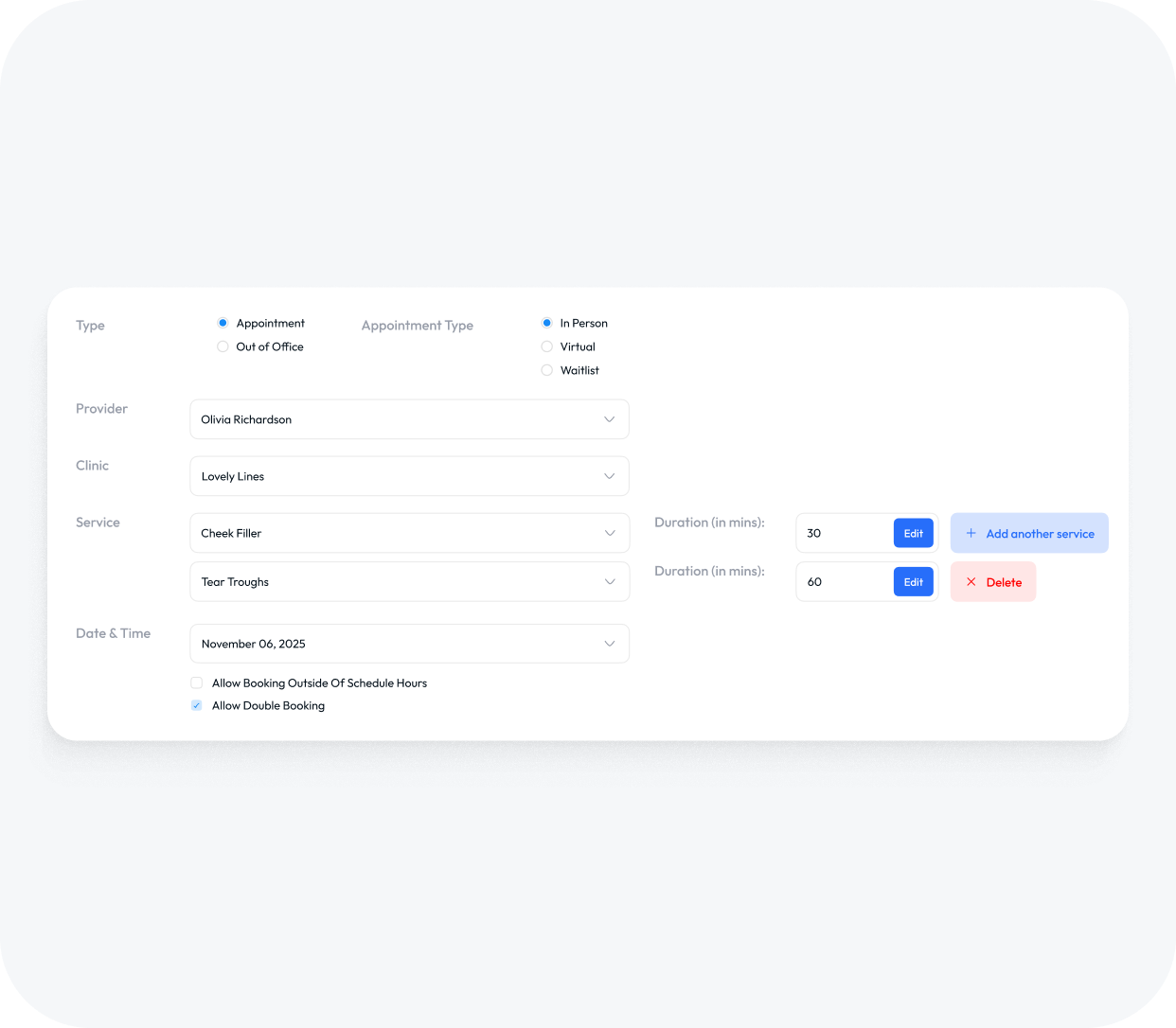
You maximize your chair time when you book clients for multiple services in a single visit. But providers may not need the full time for each service. Staff can edit the time for each to account for efficiencies gained with multiple treatments in one appointment.
Double Booking
Double booking isn’t always a bad thing! Perhaps, you want to see one patient while another numbs. Staff can make the decision double book an appointment so you can get more patients on the schedule without creating chaos.
Booking Outside Scheduled Hours
When a VIP patient needs in, a provider may decide to come early or stay late. Staff can work around the scheduled hours to book patients in during off time as long as the provider is on the scheduled that day.
Full Visibility On-The-Go
Providers can take their schedules on-the-go with full scheduling capability on the iOS Provider App. They can check their schedules in real time, rebook their clients from the treatment room, and keep track of the entire clinic’s schedule in case they need to move patients around.
Every Detail in One Convenient Screen
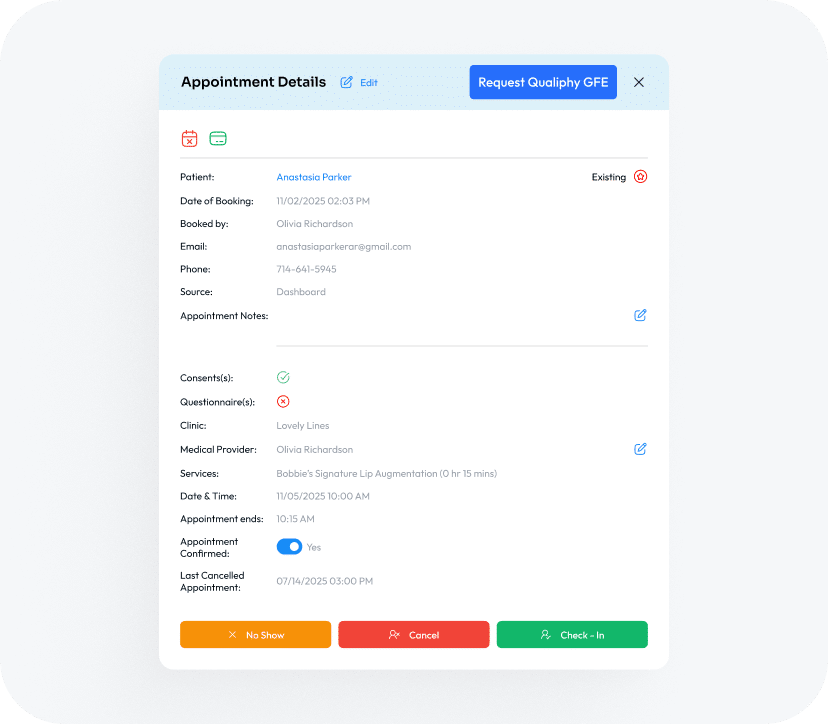
Your staff have visibility to every detail of upcoming appointments with expanded appointment cards. Visible from the web-based portal of the iOS app, the appointment card shows real-time information from deposit to confirmation, paperwork to membership status.
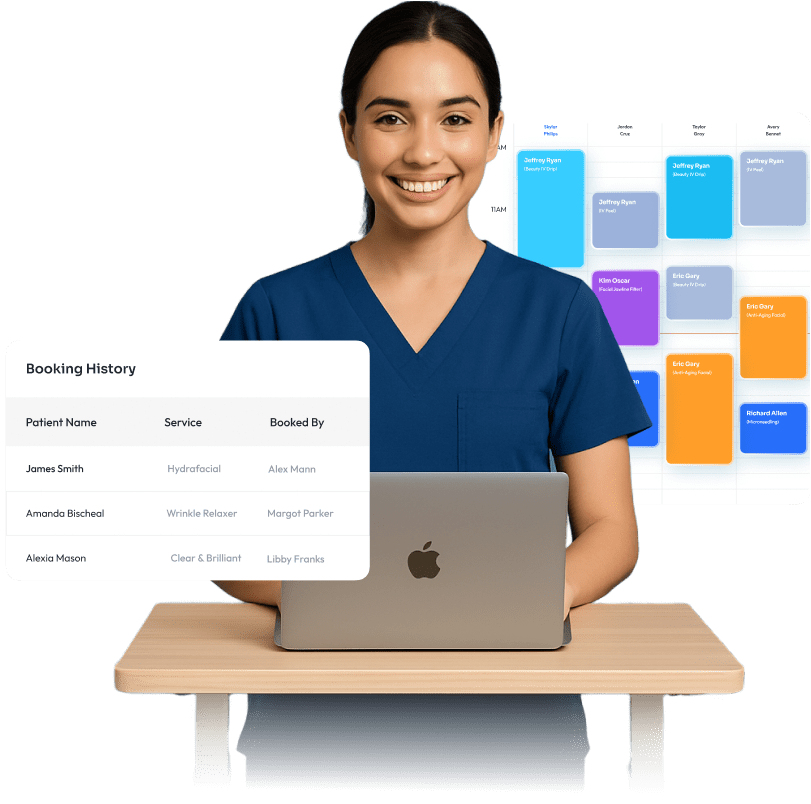
Booking History
Staff can see the history of any changes made to an appointment from edits to reschedules.
Request a Good Faith Exam
Once an appointment is made, if the patient is in need of a GFE, it can be sent to Qualiphy from the appointment card. Once requested, the button turns grey, and when completed, it turns green so you know whether or not you can move forward with treatment or need to complete the GFE before the visit.
Deposits & Cancellations
Staff can quickly check whether patients are enrolled in the cancellation policy or if they paid a service deposit via the icons on the card. A red calendar means they are enrolled in the policy and the green credit card reflects a deposit has been paid.
Confirmation, Check-In & Cancellations
When patients confirm, it’s a quick toggle on the appointment card. Once a patient check-ins for their appointment, the system sends a notification to the provider letting them know the patient has arrived. If there’s a no-show or cancellation, staff can charge or waive the cancellation fee from the same screen.
Patient Paperwork
When patients fill out their paperwork prior to the appointment, it saves valuable time that can be used for consultation or treatment instead. Front Desk staff can see if the patient’s paperwork has been completed prior to checking them in for their appointment.
Your Appointments, Your Way
Configure nearly every part of your appointment settings with Aesthetic Record’s Smart Configuration wizard. From equipment and resources to treatment instructions, reminders and surveys, everything you need to customize your schedule is there.
Equipment & Resources
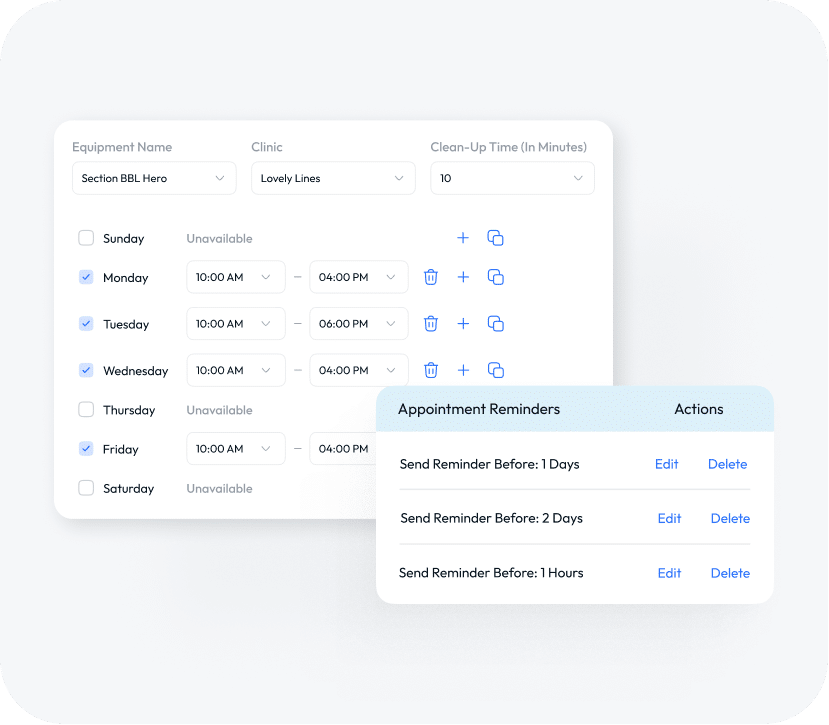
Build a schedule for your equipment, rooms and other limited resources and assign them to services so their availability is tied to booking. You can add clean up time to make sure you the time and resources you need for every appointment.
Lead Time & Booking Increments
Never be caught off guard with a surprise appointment! You can set your lead time so that nothing shows up last minute if booked by a patient, only by staff. You can also build in extra time between appointments with booking increments so you have a buffer in case appointments run over or you need a break.
Treatment Instructions
“Create pre- and post-treatment instructions” that are specific to your protocols and attach them to your services. Upon booking, patients are sent your pre-treatment instructions to their email and Patient Portal with post-treatment instructions following immediately after the appointment.
Surveys
Create surveys to capture patient feedback immediately following the appointment or at a pre-determined future time. You can build a custom survey, and once returned, the scores connect back to Business Insights and provider performance metrics. You can measure satisfaction with providers, services or the practice. You can also include links to Google or other review sites in the corresponding email.
Patient Communication
Configure your Patient Portal welcome email to automatically send to new patients when they books for the first time. Customize your appointment confirmation emails and texts to communicate the information that is most relevant like an invite to prequalify for patient financing or the instructions for parking. You can set reminder communications to go out at scheduled intervals to reduce no-shows or later arrivals.
See Smart Scheduling in Action
Built to Support Every Stage of Your Aesthetic Journey.
Book a demo and experience the difference.